Object labels
| Command: | Object labels |
| Menu path: | Projects > Settings > Object Labels |
| Icon: | 
 |
| Functional description: | The command enables adjustments of the data display on labels. |
The basic purpose of the object labels settings is to enable the user to
have data display control on certain elements, separately on the site
plan, and on the block schemes.
The settings are stored in the drawing itself, which means that the display will be identical, regardless on which computer is the drawing viewed at the moment.
Procedure
From the main menu we run Projects > Settings
> Object labels command.
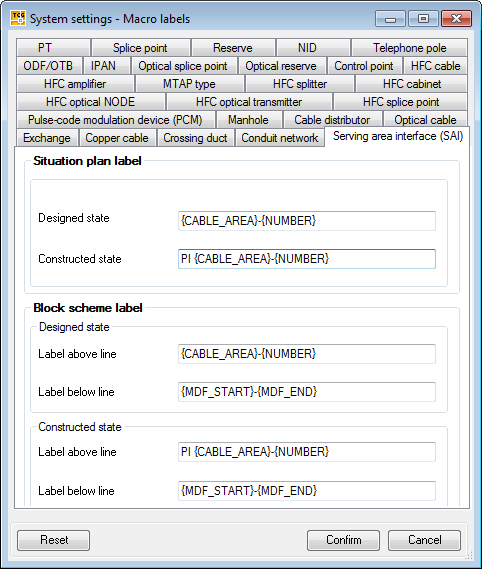
System Settings - Macro labels window will
open (Figure 1).
The window contains a tab for each TeleCAD-GIS type of object which has a label. The labels can be combines separately for as-build status, and separately for designed status of the same type object. If the label is entered in two levels, then the label above the line can be separately composed, as well as the label below the line. For certain types of objects it is possible to compose two types of labels:
If such a possibility is not given, the draft labels are the same as the site drawing ones.
The labels are prepared in advance (default settings), but the
user can compose the labels himself. It is always possible to go back to the default settings. |
Figure 1 |
Compose label
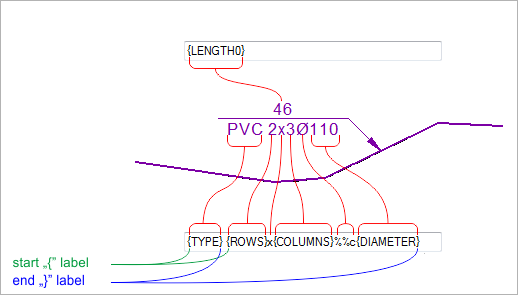
When composing a label, we use the following elements:
- Percentage (“%”)
Defines the macro labels’ blocks.
- The macro labels (see list of all macro
labels)
We use them to write in the label the values of the properties seen in the Properties window.
(e.g. on the “TYPE” macro label place, “Duct type” property value will be written (Properties > Duct type = e.g. PVC), if this is the cable duct).
- “&&” special symbol for diameter (&& = Ø)
We use it when we want to enter the diameter symbol in the label.
Percentage
is used in the similar way as we use the parenthesis “( )”, and
is uses to make the macro labels’ blocks. Blocks function in the
following way, id the value for only one macro label is missing
from the macro labels’ block, the other labels are also not written. The macro labels, different symbols and the space are entered
between the beginning and the final percentage. |
Figure 2 |
For each TeleCAD-GIS object type there is a corresponding group of macro
labels.
The list of macro labels and the explanation for each of them is given
on the Macro Labels List page.