FDI (Feeder Distribution Interface)
| Command: |
FDI (Feeder Distribution Interface) |
| Menu path: |
Copper > FDI (Feeder Distribution Interface) |
| Icon: |

 |
| Functional description: |
Adds Feeder Distribution Interface
to the site plan drawing. |
| |
FDI (Feeder Distribution Interface) command
adds FDI symbol at the user specified location in the site plan drawing.
It is necessary to enter the capacity for the FDI so that the network analysis
and automation can function properly.
| Note: |
If it is in the network, FDI impacts the automatic optimization
of feeder/distribution cables in the following way:
When there is an FDI in the network, then only the FDI capacity
is taken into account when calculating the capacity of cables
from Telephone Exchange to FDI.
Capacities of DT connected through FDI are not taken into account.
For the capacity calculation of cables that go from FDI to the
DTs, only DT capacities are taken into account. |
Adding the FDI procedure
From the main menu run Copper > FDI (Feeder
Distribution Interface) command.
The command is now active. The cursor is displayed in a form of a plus
sign (“+”) with the instructing you to specify the location for placing
the FDI. (Figure 1).
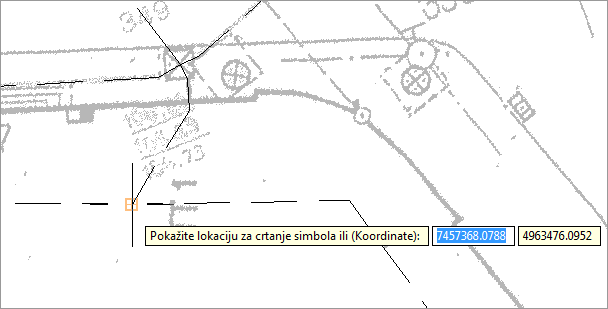
Figure 1
By left-clicking on the route-point, generate the FDI symbol (Figure
2).
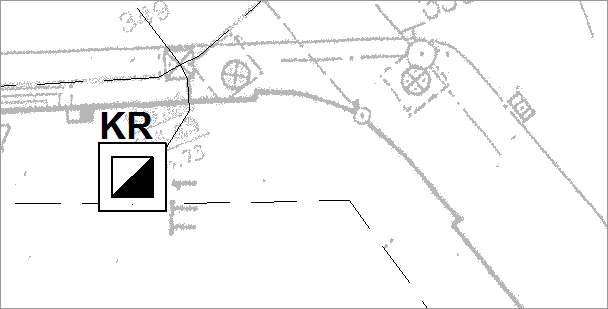
Figure 2
Properties
FDI properties are shown in the Properties
window and most of them can be edited.
TCG global properties:
- TCG Object Identifier - identification code
- Note - in this field enter remarks regarding the
selected FDI
- Owner - (Owner of the infrastructure)
Feeder Distribution Interface:
- FDI number - (manually entered or through automatic
numeration)
- Service Area - (manually entered or through automatic
numeration)
- Capacity (twisted pairs) - (entered manually)
- Name - (entered manually)
- Street name - (Name of Street where the FDI is
located)
- Building number - (the user manually enters the building
number where the FDI is located)
- FDI status - Designed
- Year built - (entered manually - offered is the current
year)
Automatic splicing at the FDI:
- Number of MDF spans - (user-defined number of spans (see note))
- Twisted pairs in the main cable - (occupancy of twisted
pairs in the main feeder cable, i.e. the cable coming from
the exchange)
- Twisted pairs in the cable - (occupancy of twisted pairs
in the cable entering the FDI (immediate cable))
1st span of ports on MDF taken by FDI
- Vertical number - (vertical on which the twisted pairs
going towards FDI are terminated)
- Start twisted pair - (first twisted pair within this span
occupied by FDI)
- End twisted pair - (last twisted pair within
this span occupird by FDI)
Attributes
- Label - (generated on the basis of previous items)
|
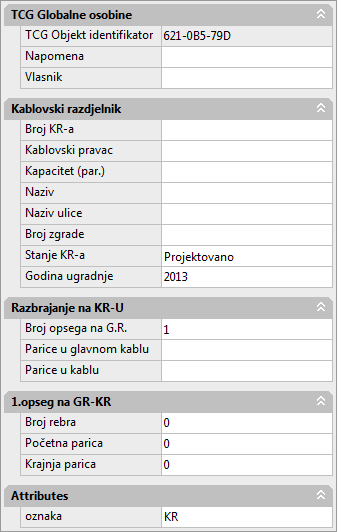
Figure 1 |
| Warning: |
Although the input field Attributes
> Label is enabled, entering new values won't cause
any real changes of attributes.
Values for this field are automatically
generated and should not be changed by the user. |
|
Note - Number of MDF spans |
If the twisted pairs terminated on FDI don’t start on the
same vertical of the MDF or they are on the same vertical but
aren’t continually deployed,
it is necessary to define several spans.
For example, we have a capacity of 40 FDI twisted pairs and verticals
on the MDF of 300 connectors (twisted pairs) capacity.
FDI twisted pairs are terminated at the MDF in the following manner:
- First vertical - twisted pairs 21 to 40
- First vertical - twisted pairs 291 to 300
- Second vertical - twisted pairs 1 to 10
In this case, for the property "number of spans on the
MDF" select value "3”, as we need three spans.
After this, in the Properties window,
below the already existing span, the program will generate two
new:
- 1st span of ports on MDF taken by FDI (already existing)
- 2nd span of ports on MDF taken by FDI
- 3rd span of ports on MDF taken by FDI
Now for each of the spans we should define:
- Vertical number
- Start twisted pair and
- End twisted pair
| |
|
1. span |
2. span |
3. span |
| |
Number of verticals |
1 |
1 |
2 |
| |
Starting twisted pair |
21 |
291 |
1 |
| |
End twisted pair |
40 |
300 |
10 |
The maximum number of spans we can define is four. |
|