Create Viewport
| Command: | Create Viewport |
| Menu path: | Layouts > Create Viewport |
| Icon: | 
 |
| Functional description: | The command creates a viewport in the selected layout. Viewport displays the site pan in the desired scale. |
What is viewport?
Viewport is an AutoCAD/TCG object located in the layout, showing everything
that is in the site plan drawing.
This view is live, meaning that all changes made in the site plan drawing
are automatically visible in the layout (i.e. all layouts which have viewports).
Hence the “viewport” name, because it is literally an object which allows
us to view the site plan drawing.
Viewport is created by Layouts > Generate Viewport
command.
To be able to create a viewport, the layouts needs to have a header with
scale or data table with defined scale.
Procedure
From the main menu run Generate Viewport command.
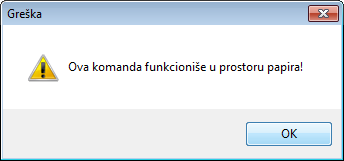
If you try to run this command while you are in the site plan, the program will warn you that it is not possible (Figure 1). |
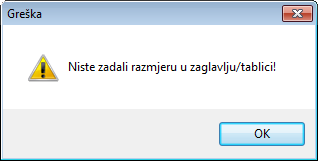
If you run the command while in the layout that has no header/data table or has them, but without defined scale, the program will warn you about that (Figure 2). |
Figure 1 |
Figure 2 |
After running the command, the program moves you to the site plan drawing
(Figure 3).
A frame is displayed next to the cursor that defines the area to be shown
in the viewport.
Frame size is determined by the scale from the header or data table.
Set the frame in the area of your interest and left-click.
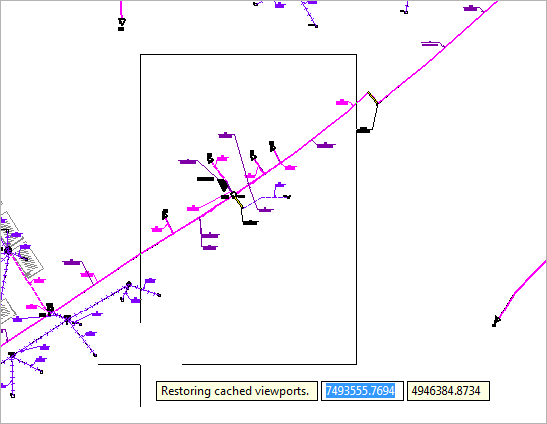
Figure 3
The program brings you back to the layout where there’s now a new viewport created that displays selected part of the site plan drawing (Figure 4).
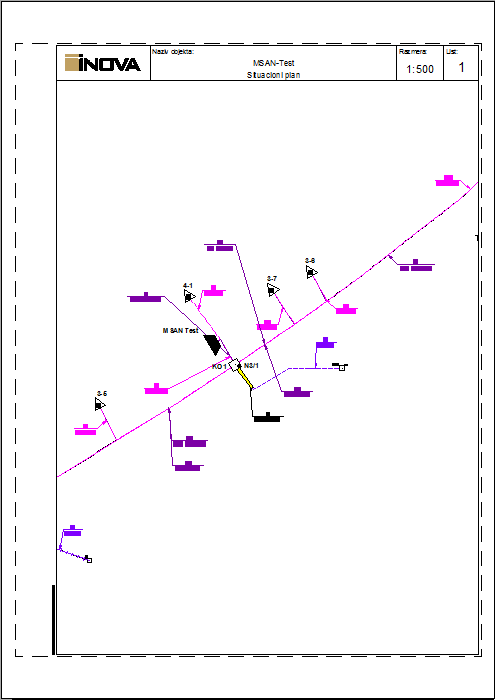
Figure 4