Save Form Changes
| Command: | Save Form Changes |
| Menu path: | Layouts > Set Form > Save Form Changes |
| Icon: | 
 |
| Functional description: | Saves changes made by one of
the commands:
|
By running Save Form Changes command, we save
the modified file and
define the insertion point of header or data table.
The program detects the type of the form and assigns the insertion point based on that.
Insertion point of the header (any type of header) is in the upper right
corner of the header,
and the insertion point of the data table is in the bottom right corner
of the table (Figure 1).
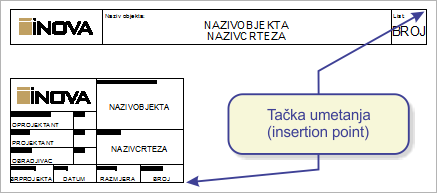
Figure 1