Window: Intra-facility Cables
Double-clicking the IFC cable (while in Edit
ISP window) opens Intra-facility Cables
window (Figure 1).
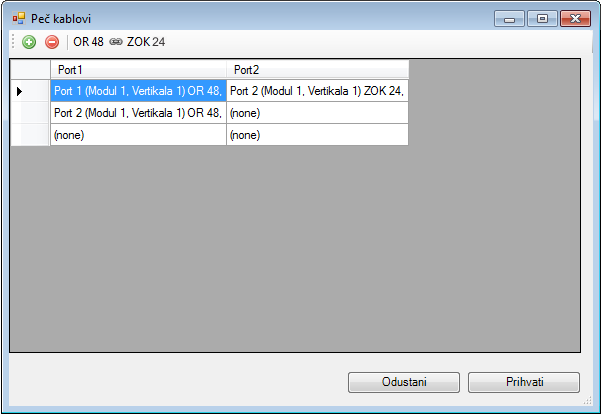
Figure 1
The window includes:
- Toolbar
- List of IFC cables connecting the ODFs
Toolbar
The toolbar contains the following tools:
 - Add
IFC Cable
- Add
IFC Cable
Adds a new IFC cable.
All newly added cables will be represented (within the inside plant) with the same polyline between ODFs which was initially used for the first IFC cable on the list. - Remove
Patch Cable
- Remove
Patch Cable
Deletes the IFC cable from the list. If all the patch cables are deleted from the list, the polyline which represented them in the inside plant view will be deleted as well. - Info:
The connection between ODFs
- Info:
The connection between ODFs
Info field which shows ODFs connected with IFC cables. They are shown in the example as “ “
“
Display of IFC cables within equipment (i.g. ODF)
IFC cables shown in the list on Intra-facility
Cables window (Figure 1) are appropriately displayed in the ODFs
(or other equipement) they connect.
In this example, for ODF 48 it appears as shown in Figure 2, and the patch
cables in OTB 24 appear as shown in Figure 3.
(ODFs are opened by right-clicking ODF while in Edit
ISP window, and then running Open to Edit
command.)
IFC cables connecting ODFs are shown as blue, unlike patch cables connecting
the ports of the same ODF,
which are black. In the images, only IFC cables connecting ODFs are shown.
“Port1” column has the ports of “ODF 48”.
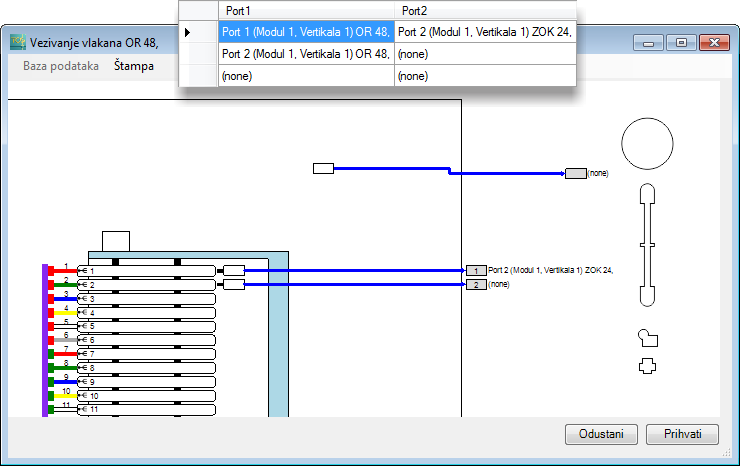
Figure 2
“Port2” column has the ports of “OTB 24”.
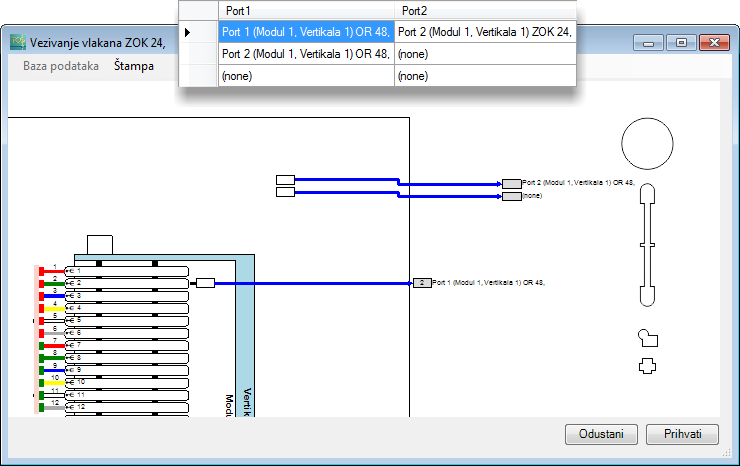
Figure 3