Optical Distribution Frame (ODF)

Command: ODF
Menu path: Fiber Optics >  FO devices > ODF
Icon: or16.png  or32.png
Functional description: ODF placement to the site plan drawing.


ODF command places optical distribution frame (ODF) with predefined properties.
ODF symbol is displayed on the site plan drawing as shown in Figure 1.
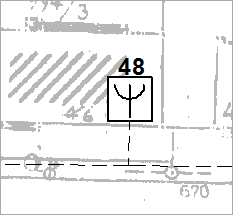
optcrtanje_or.png

Figure 1

This method results in ODF with the following properties:


ODF properties
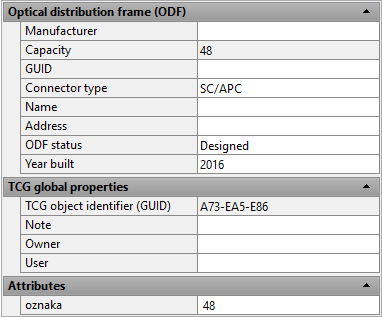

ODF:

  • Manufacturer - name of manufacturer  (entered by the user)
  • Capacity - ODF capacity (default value is 144)
  • ID - ODF label (entered by the user)
  • Connector Type - (default connector type, defined in system settings)
  • Building Name - name of the building where ODF is located (entered by the user)
  • Building Address - address of the building where ODF is located (entered by the user)
  • ODF Status - it can be Designed or Built  (selected by the user)
  • Year Built - year of ODF installation (current year is offered)

TCG Global properties

  • TCG Object identifier - (identification number)
  • Note - (write an arbitrary note that refers to the selected ODF)
  • Owner - (Infrastructure owner)
  • User - (Infrastructure user)

Attributes

  • Label - (ODF label generated based on the previous items)

optcrtanje_or_2.png

Figure 2

Use Properties window to set the ODF properties (Figure 2).

Warning:

Even though Attributes > Label field is enabled, new value entry will not bring about actual property change.
The values of this field are automatically generated and the user should not edit them.


ODF placement

The placement procedure is the same for all FO nodal elements.
The difference lies in the object which is to be placed by the used command (ODF, OTB, Patch Panel, Device, Router, IPAN or ONT).
The laying procedure is described on Laying FO nodal elements page.


Splicing

The procedure of ODF splicing/connecting is described on Fiber splicing in FDB page.